The pallet arrives on Tuesday. The supplier’s invoice arrives eleven days later.
In between, that stock is sitting on your shelf and, unless you tell the system otherwise, missing from your figures. Anyone checking availability is working from a number that’s wrong in the direction that costs you sales. This separates the two events, so goods arrive when they arrive.
What you can do
- Receive against a purchase order, line by line, with ordered, already received and still outstanding shown as you go.
- Choose which warehouse the goods land in.
- Record part deliveries: take what came, leave the rest outstanding.
- Note what you rejected as well as what you accepted.
- Keep a list of receipts, each against its order, with date, line count and status.
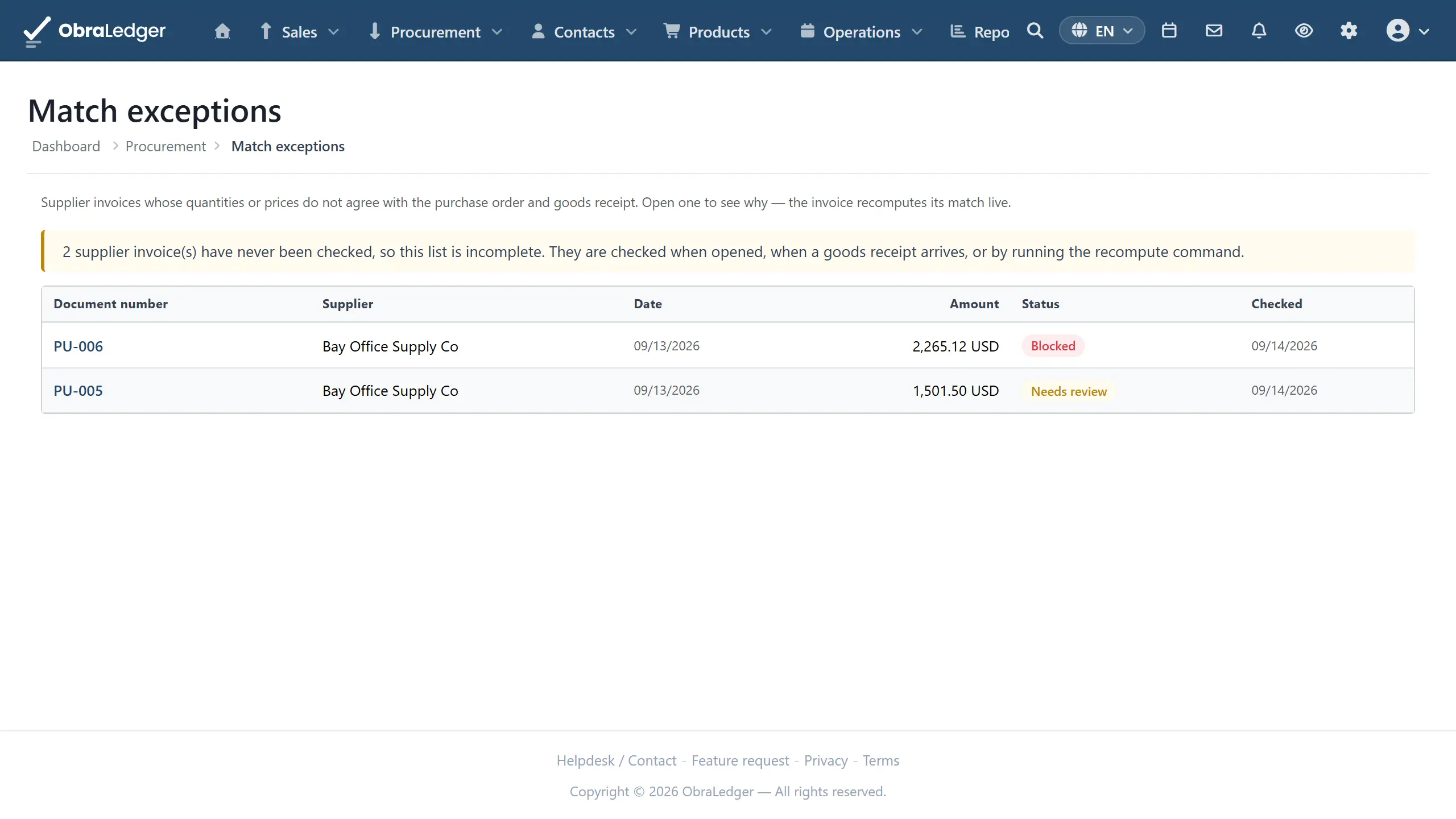
- Check the supplier’s invoice against what you ordered and what turned up, line by line, and see in words why any line does not agree.
- Set how much of a difference you will tolerate, as an amount or a percentage, or insist on exact.
- Stop payment on an invoice that does not match, with an override that asks for a reason and records it.
- Work through a queue of the invoices that need looking at, rather than finding them one by one.
How it works in practice
Start from the order (Procurement → Procure-to-Pay → Goods Receipts → Receive goods). Pick the purchase order and its lines load with three numbers each: ordered, received so far, and remaining. The quantity defaults to the remaining amount, because a full delivery is the common case and retyping it is just an opportunity to be wrong.
Say where it went. Choose the receiving warehouse and stock arrives there immediately on submit, through the same single stock path everything else uses, so the movement shows in the product’s history with the receipt as its cause.
Take part of a delivery. Enter what actually turned up. The order keeps the remainder outstanding, so the next lorry gets received against the same order without anyone tracking the difference on paper.
The books keep up with the lorry. Receiving posts the stock and, against it, what you now owe the supplier for goods you have but haven’t been billed for. It’s valued at the price you ordered at, because that’s the only price anybody knows yet. When the invoice turns up, that holding amount clears and any difference between the ordered price and the billed one is shown as exactly that, a price difference, rather than quietly changing what your stock is worth.
The purchase invoice then stops moving stock. This is the important consequence and the reason the whole thing exists. With goods receipts switched on, the supplier’s invoice is a financial document only: the goods were already booked in at the receipt, so nothing gets counted twice. With the extension off, the purchase invoice moves stock the way it always did.
Good to know
- You’ll need the Procure-to-Pay extension switched on (Settings → Extensions), and stock switched on first, since this moves stock and there has to be stock to move.
- The match is checked at payment, not at posting. An invoice that does not agree with the order and the receipt still reaches your books and your supplier balance, because leaving it out would hide it from what you owe. What it cannot do is get paid until somebody either fixes it or overrides it and says why.
- Receiving more than you ordered is not treated as the invoice’s problem. It is flagged for review, and it never blocks payment on its own - an over-delivery is a conversation with the supplier, and says nothing about whether the invoice is right.
- Until you set a tolerance, matching is exact. New companies start with no allowance at all, so a penny of difference is a difference. Set what you will accept, as an amount or a percentage, before the first run of invoices rather than after (Company settings → Finance → Three-way match).
- A month end with goods in the yard and no invoice comes out right. The receipt puts the stock in your figures and the money you owe for it alongside, so the balance sheet balances instead of being overstated by whatever is standing outside. The two accounts it uses appear the first time they’re needed, and you can point them at accounts you already keep.
- A receipt can’t be cancelled. There’s no undo and no delete, so a receipt entered against the wrong order or the wrong quantity is put right by a stock correction and, where it has already reached your books, a journal. Check the quantity before you submit.
- There are no requisitions or approval steps. Somebody with the permission receives goods, and any approval you need happens before the purchase order.
- No supplier scorecard. Every late or short delivery is recorded, but nothing adds them up into a view of which supplier keeps doing it.
- The quantity you reject is recorded, not returned. Sending it back is a conversation with your supplier and, usually, a credit note.